
Your GBP Campaign Has a ChatGPT Problem
 Gyi TsakalakisPresident, AttorneySync
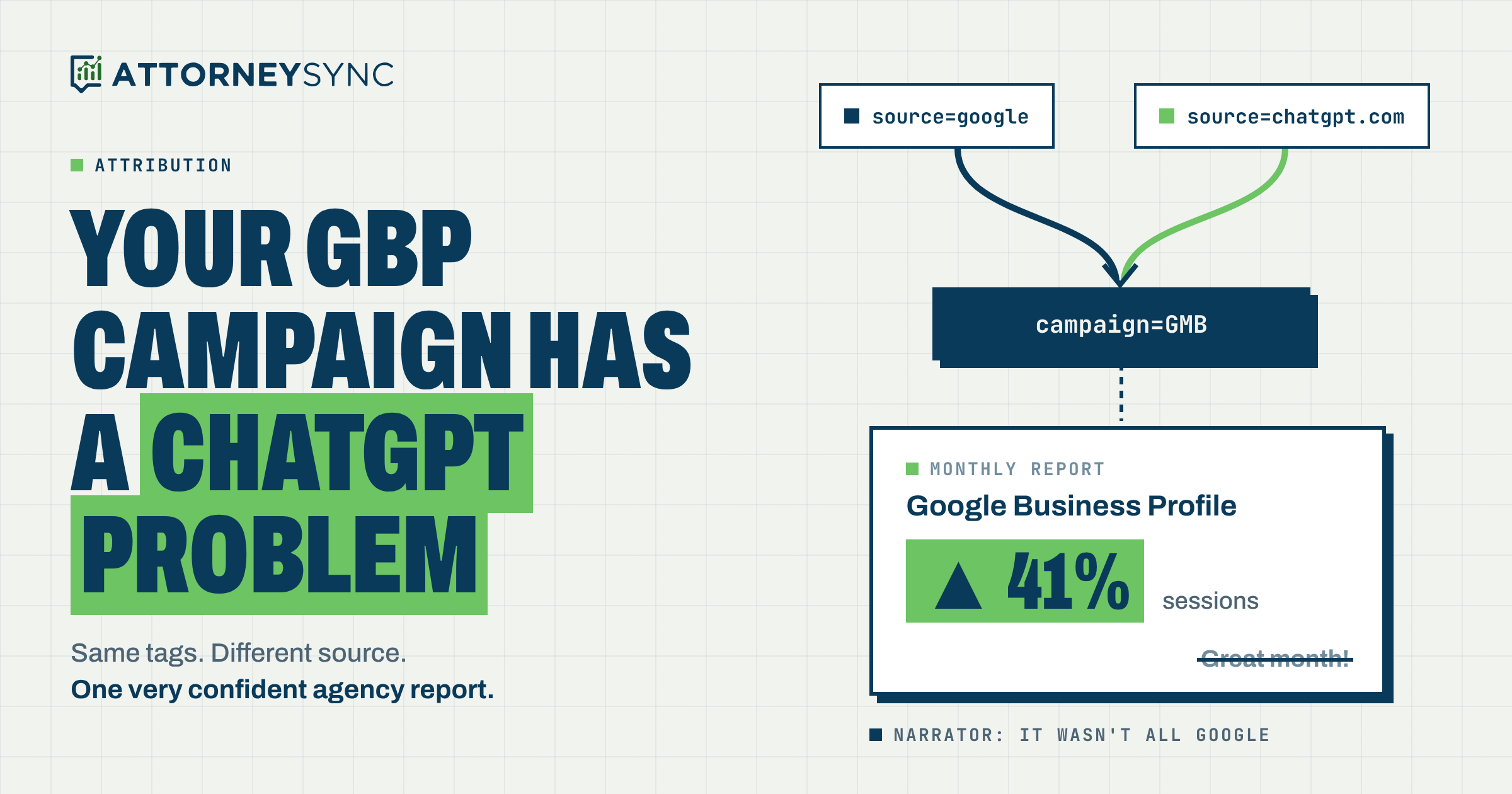
I’ve spent a good chunk of this fall standing in front of rooms full of lawyers saying some version of the same thing:
Your marketing reports are lying to you.
Not on purpose. (Usually.) But they’re lying.
I said it in Las Vegas at 8am’s Kaleidoscope conference in September. I said it at the Great Legal Marketing Summit in October. I said it again last week in Charleston at Best Era’s AI Era 2.0.
Different rooms. Different audiences. Same nods. Same nervous laughter. Same guy in the back row pulling up his agency’s latest PDF on his phone.
And every time, someone comes up afterward and asks some version of: “OK, but what does that actually look like?”
Fair question. Here’s what it looks like.
Exhibit A: Google
Most decent local SEO programs tag the website link on the firm’s Google Business Profile with UTM parameters. Something like:
?utm_source=google&utm_medium=organic&utm_campaign=GMB&utm_content=mainQuick housekeeping before the pedants fire up their email.
Yes, we know. It’s Google Business Profile now. GBP. Google retired the Google My Business name back in 2021.
And yes, a lot of law firm UTM parameters, maybe most of them, still say utm_campaign=GMB. Including this one.
Should you go update yours to GBP? Nah. A campaign name is just a label. Google Analytics doesn’t care what Google is calling the product this year. Change it and you split your history into two campaigns, break every report, filter and CRM rule built on the old name, and gain… a label that matches the latest rebrand.
This thing has been Google Places, Google+ Local, Google My Business and now Google Business Profile. Want to bet that’s the last rename? I’ll keep my tags, thanks.
So for the rest of this post: GBP is the thing. GMB is the tag.
Without the tags, Google Analytics dumps your Business Profile clicks into the giant soup that is “Organic Search.” With them, you can see what your listing actually does.
Here’s a Chicago personal injury firm in Google’s AI Mode. Hover over the Website button and you get exactly what you’d expect:
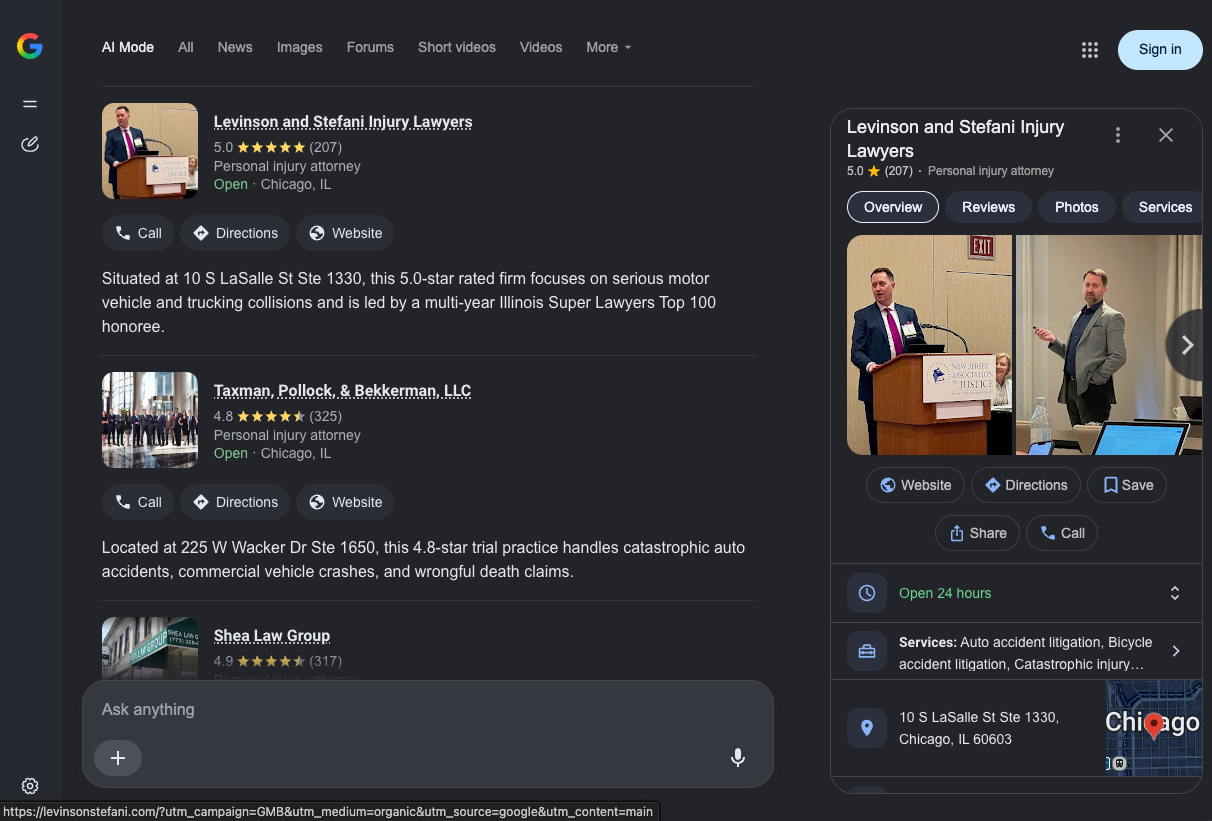
?utm_campaign=GMB&utm_medium=organic&utm_source=google&utm_content=mainLovely. Everything working as intended.
Exhibit B: ChatGPT
Now here’s the same firm in a ChatGPT local result:
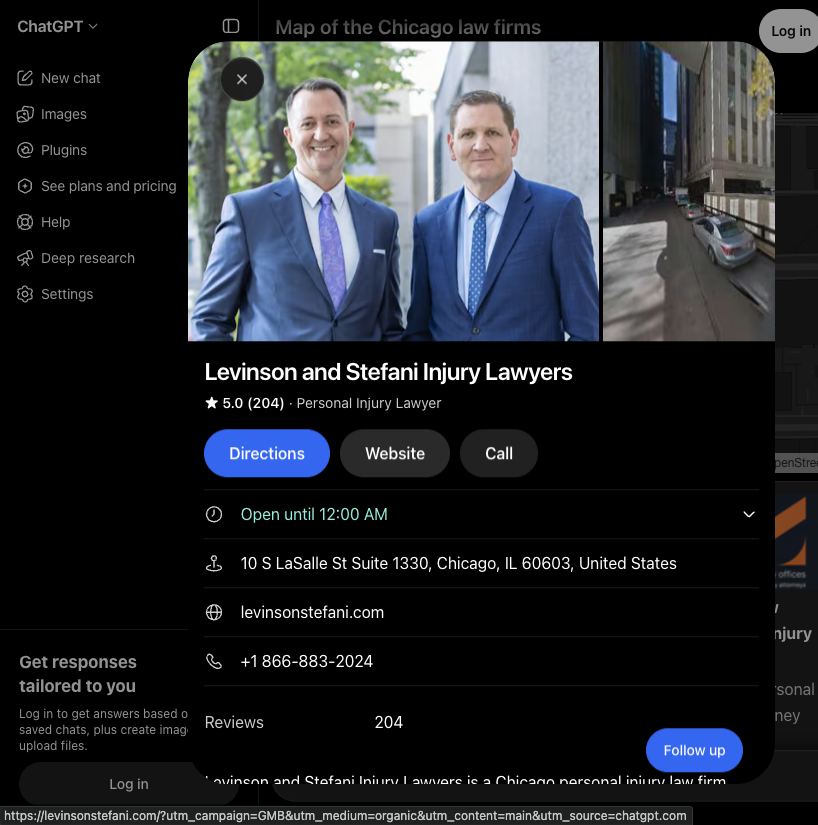
?utm_campaign=GMB&utm_medium=organic&utm_content=main&utm_source=chatgpt.comLook closely.
Campaign: GMB. Medium: organic. Content: main. Those are the firm’s tags, straight off its Business Profile.
Source: chatgpt.com. That’s ChatGPT swapping out google for itself and tacking it on the end.
So ChatGPT appears to be grabbing the website URL from the firm’s Business Profile data, tags and all, ripping out the source, and stamping its own name on it.
Bonus fun fact: Google shows the firm as “Open 24 hours” with 207 reviews. ChatGPT says “Open until 12:00 AM” with 204. So ChatGPT isn’t looking at the live listing. It’s working from a copy, a few reviews behind. Industry reporting suggests ChatGPT pulls local business data from a handful of third-party providers (Social Places, Search Engine Land). Wherever your Business Profile data goes, your tagged link goes with it.
Exhibit C: the report
Here’s the GA4 acquisition report, filtered to the GMB campaign:
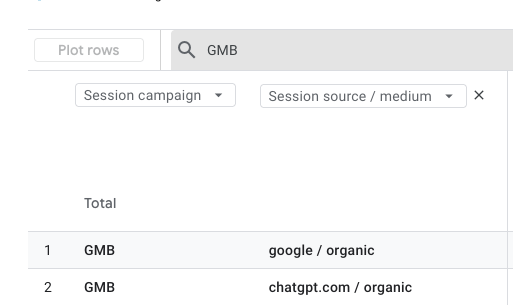
One campaign. Two sources.
- GMB / google / organic
- GMB / chatgpt.com / organic
We can see this because someone bothered to add a secondary dimension.
Now picture the typical agency report. “Google Business Profile: sessions up 41%! Great month!” Smiley face. Invoice attached.
Was it a great month for your Business Profile? Or a great month for ChatGPT? Who knows. Certainly not the report.
Why should you care?
Because you’re making budget decisions with this stuff. Or at least, I hope you are. Otherwise what are we doing here?
Your Business Profile looks better than it is. Every ChatGPT visit in the GMB campaign makes your local SEO look like it’s working harder than it is. Great news for your local SEO vendor. Less great for you.
Your AI visibility looks worse than it is. Lawyers keep asking me, “Is AI actually sending us anything?” For a lot of firms, the honest answer is, “Yes, and your report has been giving Google the credit.”
ChatGPT traffic is hiding in Organic Search. GA4’s default channel grouping puts a session in Organic Search if the source is a search engine or the medium is exactly organic. The firm’s own tag says organic. ChatGPT keeps it. So these visits land in Organic Search, not Referral, and not in that shiny “AI Traffic” channel your agency built last spring. (Unless that rule runs before Organic Search. It probably doesn’t.)
The calls are probably wrong too. Look at the ChatGPT card again. There’s a big Call button with the firm’s phone number. If your Business Profile uses a call tracking number (and it should), ChatGPT is showing that number. Someone taps Call in ChatGPT, never visits your website, and your call tracking logs a “Google Business Profile” call. For PI, criminal and family law firms, where most cases start with a phone call, that’s a bigger mess than anything in GA4.
Your trends are meaningless. GMB is flat year over year. Is your Business Profile holding steady? Or is Google traffic falling while ChatGPT covers for it? Those are very different problems with very different fixes. One campaign total can’t tell you which.
And it gets worse when ChatGPT forgets to tag. Earlier this year, ChatGPT links started showing up without utm_source=chatgpt.com. OpenAI said it was a bug (Search Engine Land, Search Engine Roundtable). Think about what that means for a link that already has your tags. If ChatGPT passes your Business Profile URL through without adding its own source, your original utm_source=google stays put. That ChatGPT visit looks exactly like a Google visit. Good luck untangling that after the fact.
This isn’t a tracking problem. It’s a “how did they pick us?” problem.
Choosing a lawyer from Google and choosing a lawyer from ChatGPT are not the same experience.
On Google, someone looks at a list of firms, compares stars, review counts, photos and distance, and picks one. You’re competing with the firms around you on prominence and reviews.
In ChatGPT, someone describes their situation, often in a lot of detail, and gets a short answer with a few recommendations and the reasons for them. You’re competing on whether the AI understands your firm and describes it accurately and favorably, based on whatever it found about you across the web.
The work that wins each of those overlaps. It isn’t the same work. Mash them into one campaign and you’ve lost the feedback that tells you where to invest.
Is this a big deal or am I being dramatic?
Little of both.
AI referrals are still a small slice of overall website traffic. Studies of large sets of websites put AI assistants well under 1% of total traffic in 2026, somewhere around a third of a percent (Ahrefs, SE Ranking, Similarweb). ChatGPT accounts for most of it, with estimates anywhere from about 60% to over 90%, depending on who’s counting.
But it’s growing fast. SE Ranking reported ChatGPT referrals hit an all-time high in May 2026, after ChatGPT made brand links more prominent in its answers.
And some agency studies of law firm GA4 accounts report AI referrals converting as well as, or a lot better than, organic search (Magnify Lab, Civille). Small samples, wildly different results. Take them with a grain of salt. Maybe a shaker.
Here’s why “small” is misleading: AI traffic doesn’t spread evenly across your site. ChatGPT’s local recommendations go to the same link as your Business Profile, usually your homepage, and those people are close to hiring someone. Add even a little high-intent ChatGPT traffic to a campaign that’s also small and high-intent, and the numbers move.
And this isn’t one firm’s quirk. Every business that tags its Business Profile link and shows up in ChatGPT’s local results can have the same blend. That’s a lot of law firms reading a lot of very confident reports.
OK, so what do I do?
Don’t rip the UTM tags off your Business Profile. They’re still the best way to separate your listing from the rest of organic search. Just stop reading the campaign by itself.
1. Never look at the GMB campaign without its source. In GA4, go to Reports → Acquisition → Traffic acquisition. Set the primary dimension to Session campaign, add Session source / medium as a secondary dimension, and search for “GMB.” Every source under that campaign is its own story. Do the same for key events: form fills, calls, whatever you count.
2. Build a custom channel group. In Admin → Data display → Channel groups, create a new group (leave the default alone) with these rules, in this order:
- AI Assistants: Session source matches regex
chatgpt|openai|perplexity|gemini|copilot|claude - Google Business Profile: Session campaign exactly matches
GMBand Session source exactly matchesgoogle - Everything else, including Organic Search
Order matters. Rule 1 has to catch ChatGPT before organic sends it to Organic Search.
3. Check what your CRM is actually storing. If your forms pass UTM values to your CRM or intake software, look at which ones. A lot of setups only store utm_campaign. If that’s you, every ChatGPT lead from this link is sitting in your CRM labeled “GMB,” and no amount of GA4 cleanup will fix your cost-per-case numbers. Capture all five UTM parameters, the landing page and the referrer on every lead.
4. Check your calls. Compare the calls in your Business Profile’s own performance data (Google-only) with the calls your tracking platform logs on the Business Profile number. If the gap is growing, someone else is showing your number. ChatGPT is a good bet. And for every one of those callers, your intake team should be asking how they found you. More on that in a minute, because it matters more than anything in this list.
5. Mark the date. Note when ChatGPT first shows up in your GMB campaign. Year-over-year comparisons before and after that date aren’t apples to apples.
6. Check every month. Filter your GMB campaign for any source that isn’t google. Anything new means another platform is recommending your firm. You want to know that.
Ask them how they found you. Seriously.
Here’s the uncomfortable truth about everything above: it’s all software making educated guesses.
Analytics only sees what happens on your website, in a browser, with cookies allowed, tags intact and tracking working. That’s a lot of ifs. And plenty of what actually matters happens where analytics can’t see it:
- Someone asks ChatGPT for a recommendation, taps Call, and never visits your website. Analytics: nothing.
- Someone hears your name from their brother-in-law, sees it again in ChatGPT, then Googles your firm and clicks your Business Profile. Analytics: “GMB / google.” The brother-in-law gets zero credit. (Sounds about right for brothers-in-law.)
- Someone drove past your billboard for six months, heard your radio spot, then searched “car accident lawyer” and picked you because they recognized the name. Analytics: “Organic Search.” Your SEO vendor sends a celebratory email.
- Someone gets your website in a text from a friend. Analytics: “Direct.” Thanks, analytics. Super helpful.
Your intake team is the only part of your marketing operation that actually talks to these people. So have them ask.
Ask everyone. Every time. “How did you hear about us?” goes in the intake script for every call, every chat and every form. Not just when intake remembers or when it’s slow. Make it a required field in your CRM. Optional fields stay empty. That’s not cynicism. That’s every CRM I’ve ever looked at.
Ask open-ended first. “How did you hear about us?” Then stop talking. Write down what they say, in their words. “My cousin told me about you, and then ChatGPT said you were good with trucking cases” is gold. A dropdown that says “Internet” is not.
Then ask a follow-up. “Did you look us up anywhere before you called?” That’s where Google, your reviews, ChatGPT, your website and your videos come out. The first answer usually tells you where the demand came from. The follow-up tells you where they checked you out.
Then categorize, but keep the original. Give intake a short pick list for reporting: friend or family referral, attorney referral, former client, Google search, Google Maps or Business Profile, ChatGPT or another AI tool, TV, radio or billboard, social media, other. Store the pick and the verbatim answer.
Don’t lead the witness. “Did you find us on Google?” gets a yes. Everybody found everything on Google.
Is self-reported attribution perfect? Of course not. People misremember. Lots of people say “Google” when they mean “I typed your name into my phone.” Some people say “the internet,” which is about as specific as “a building.”
But it catches what software never will: who recommended you, what made your name stick, and more and more often, whether an AI tool was part of the decision. Fuzzy data about the right question beats precise data about the wrong one.
Put the numbers next to the answers
Neither source is “the truth.” Analytics is precise and narrow. What clients tell you is broad and fuzzy. The useful stuff is where they disagree.
So stop keeping them in separate places. Put them side by side, lead by lead, every month. Each lead should have three things in one record:
- What the tracking says: UTM source, medium and campaign, landing page, call tracking source, click IDs.
- What the person said: the category and the verbatim answer.
- What happened: qualified or not, signed or not, and what the case is worth.
Then look for the patterns:
| Tracking says | Client says | What it probably means |
|---|---|---|
| GMB / google | “Google” or “I read your reviews” | They agree. Your Business Profile did its job. |
| GMB / google | “ChatGPT recommended you” | AI made the recommendation and Google got the click. Or ChatGPT didn’t tag the link. Either way, GBP is getting credit for AI. |
| GMB / chatgpt.com | “I Googled you” | They don’t remember, or they asked ChatGPT and then checked your reviews on Google. Both count. |
| Direct, or a search for your firm’s name | “My friend referred me” | The referral created the demand. Search just captured it. |
| A search for your firm’s name | “Saw your commercial” | Your advertising created demand that last click hands to Google. |
| A phone call with no website visit | Anything | What they told you is the only attribution you have. Don’t throw it away. |
Then pull in Search Console, because that’s where demand shows up that never looks like a referral:
- Split branded from non-branded searches. Separate queries that include your firm’s or lawyers’ names from everything else. If branded searches are climbing while non-branded is flat, something outside search is making people look you up by name. Your intake answers will tell you what.
- Line it up with what people tell you. If “ChatGPT” is showing up more in intake while branded searches climb, AI recommendations are probably sending people to Google to check you out. Last click hands that to Google. It wasn’t Google’s idea.
- Track how often the two agree. Measure the share of leads where the tracked source and the self-reported source match. When that number moves, something changed in how people find you. That’s worth more attention than most of what’s in your monthly report.
Two ground rules.
Don’t pick a winner. The point isn’t to decide whether analytics or intake is “right.” It’s to use each one to check the other.
Judge by signed cases, not leads. A source that produces lots of calls and very few signed cases looks great in analytics and terrible in your bank account.
(I wrote more about this in The Solution to Limited Attribution is More Attribution. Short version: last-click attribution isn’t useless. It’s just not the whole story, and it’s especially bad at telling you where demand came from.)
The part where I talk about us (sorry, it’s our blog)
This is what I keep trying to get across on stage.
Most law firm marketing agency reports are built from screenshots. A monthly PDF with GA4’s default channels, a Business Profile performance chart, a call count from the call tracking dashboard. Every number comes from a different tool with its own definitions, and somebody looks at all of it once a month.
When ChatGPT starts sending traffic through your Business Profile link, nothing in that report changes, except GMB looks great and AI looks like zero. Nobody has a reason to dig. Why would they? The number went up.
And if someone does notice, fixing it means rebuilding reports by hand. For every client. Every month. Want to guess how often that happens?
That’s why we built our data infrastructure the way we did.
Standardized tracking. Imhotep, our marketing operations platform, sets up the same Google Tag Manager tracking on every client’s landing pages. Tags mean the same thing everywhere, so when something weird shows up, it’s easy to spot and easy to fix across the board.
One warehouse, refreshed daily. Ad, analytics, call tracking and budget data go into a central data warehouse every day. We keep the raw source, medium and campaign, not just whatever channel label a tool decided on. Splitting GMB-from-Google and GMB-from-ChatGPT is a reporting change, not a tracking rebuild. And it works on historical data too.
Dashboards every morning, not PDFs once a month. Campaign performance, lead-level funnel conversions, budget pacing and Search Console trends, refreshed daily. A new source showing up inside an old campaign gets noticed in days, not next quarter.
Leads tied to signed cases. SyncStream connects your CRM to your marketing data. It sorts leads into qualified and signed and matches them back to their source using CallRail data and click IDs. We report cost per qualified lead and cost per signed case by source.
What clients say, next to what they clicked. Because SyncStream already pulls lead records from your CRM, the “How did you hear about us?” answer your intake team records sits in the same place as the click ID, the call tracking source, the campaign and whether the case signed. The side-by-side comparison above isn’t a spreadsheet someone builds once a year. It’s part of the reporting.
From last clicks to client journeys
Most agency reports answer one question: what was the last thing someone clicked before they called?
That’s useful. It’s also the least interesting part of how someone chose a lawyer.
We’d rather show you the journey. Where the demand came from: a referral, a commercial, a ChatGPT answer, a video someone watched months ago. Where they checked you out: your reviews, your website, your firm name in Google. And where they finally reached out: the click, the call, the form. Each piece comes from a different source. Paid click IDs, call tracking, GA4 sessions, Search Console brand trends, intake answers and CRM outcomes. None of them tells the whole story alone. Together, they get a lot closer.
Here’s a hypothetical. Say a firm’s last-click report says 40% of its signed cases came from Google Business Profile. Intake answers show a third of those clients first mentioned a referral, a TV spot or ChatGPT. Search Console shows searches for the firm’s name up since the TV campaign started.
The last-click conclusion: cut TV, pour everything into local SEO. GBP is crushing it!
The journey conclusion: TV and referrals are creating demand, the Business Profile is converting it, and ChatGPT is a growing step in between. So keep the TV, keep building reviews, make sure AI tools describe the firm accurately, and invest in the people sending referrals.
Same data. Very different checks written.
That’s what a clearer picture of the client journey buys you:
- Budget follows what creates demand, not just what captures it. You stop cutting the channels that look bad on last click but are the reason people search for you by name.
- You catch new paths early. Like ChatGPT recommending your firm, while competitors still think AI sends them nothing.
- You optimize for cases, not leads. Cost per signed case by source, checked against what clients actually told you, so you aren’t chasing the cheapest lead.
- You deploy people, not just dollars, better. If intake keeps hearing “my attorney friend sent me,” that’s a referral marketing program waiting to happen. If it’s “ChatGPT,” that’s AI search optimization. If it’s “your reviews,” that’s local SEO and the client experience that earns those reviews.
The question was never “which channel gets the credit?” It’s “where should our next dollar and our next hour go?” You can only answer that if you can see the journey, not just the last step.
Same message, new example
Your UTM tags didn’t break. The internet changed underneath them. Links built to measure one channel are now quietly measuring another, and most reports won’t tell you.
That’s what I was talking about in Vegas, in Virginia and in Charleston. This is just the newest example. There will be another one next month.
So, homework: open GA4, pull up your GMB campaign, and add source as a secondary dimension. If ChatGPT is in there, congratulations. You just learned more about how people are finding your firm than your last three agency reports told you.
If you want help splitting Google from ChatGPT in your own data, lining it up with what your clients actually tell you, and tying all of it to signed cases, check your eligibility to talk with us.